

This is for the documents leaving history for studying Spring Boot referred to the book called “Jump to Spring Boot”
 Disclaimer
This post is a personal study note created while learning the topic discussed. Some information may be inaccurate or incomplete. If you notice any errors or have suggestions, I’d sincerely appreciate your feedback.
Spring Boot is a tool that helps developers build web applications quickly and easily based on the Spring framework. It comes with an embedded web server such as Tomcat and offers various convenient features, including auto-configuration, to boost developer productivity. Tomcat is a web application server that handles HTTP requests from clients, forwards them to servlets (Java-based components), and returns the generated responses.
What is a web framework?
If you're unfamiliar with the term web framework, let's take a moment to understand what it means.
Anyone who has tried building a web application knows how many features are needed to make it fully functional. For example, you need to handle cookies and sessions, implement login and logout functionality, manage user permissions, connect to a database, and much more.
Implementing all these features from scratch can be time consuming and inefficient. That’s why web frameworks exist, they provide ready-to-use tools, components, and structures that help you develop these common features more easily.
In simple terms, a web framework acts like a starter kit for building web applications quickly and efficiently.
One such framework in the Java ecosystem is Spring Boot. With Spring Boot, you can create web applications much faster than traditional Java development by learning just a few basic conventions and settings.
For example, to display "Hello World" in a web browser like Chrome or Safari, you only need to write a single Java class.
@Controller
public class HelloController {
@GetMapping("/")
@ResponseBody
public String hello() {
return "Hello World";
}
}
Java
복사
Understanding How Spring Boot Works
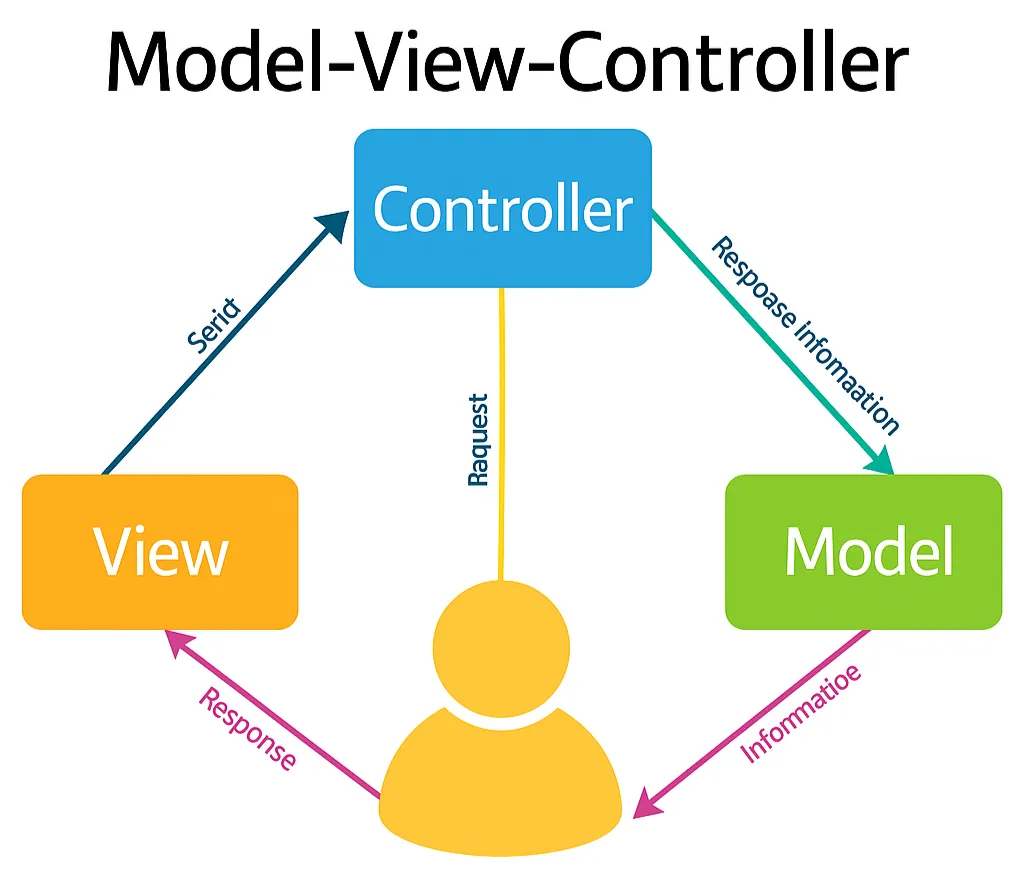
Spring Boot follows the MVC (Model-View-Controller) pattern, but since this is our first session, we’ll just give it a very brief introduction for now.
Don’t worry if it doesn’t all make sense right away, just read through it lightly for now.
Model – The Core of Data and Business Logic
•
Role : The Model handles the core data of the application and contains the business logic to process it.
•
Characteristics
◦
Directly interacts with the database (e.g., JPA entities, DAOs).
◦
Responsible for retrieving, updating, or deleting data.
◦
Loosely coupled with other components, focusing on encapsulating business rules.
•
Spring Boot Example
◦
Classes annotated with @Entity such as User, Post
◦
JPA repositories like UserRepository
◦
Domain service classes that perform logic or calculations
View – The User Interface Layer
•
Role : The View is what users see and interact with. It presents data received from the Model and builds the user interface.
•
Characteristics
◦
Responsible for UI rendering (e.g., HTML, Thymeleaf, React)
◦
Doesn’t contain logic to manipulate data—it only displays it
◦
Usually rendered by the Controller after it passes data to the View
•
Spring Boot Example
◦
HTML files in the templates folder (Thymeleaf, Mustache, etc.)
◦
Data passed through ModelAndView or Model objects
Controller – The Request Handler and Flow Coordinator
•
Role : The Controller handles user input (requests), selects the appropriate Model logic, and determines which View to return. It acts as a coordinator between the View and the Model.
•
Characteristics
◦
Maps URIs to logic (/login, /posts, etc.)
◦
Handles input validation, selects models, and determines the view to render
◦
Ideally contains minimal business logic, delegating to the Model
•
Spring Boot Example
◦
Classes annotated with @RestController or @Controller
◦
Methods using @GetMapping, @PostMapping, etc.
◦
Example: Processing login forms and choosing the next screen
User → Controller → Model → View → User
As shown in the diagram, the MVC pattern follows this general flow:
1.
The user sends a request by clicking a button or entering a URL.
2.
The controller receives the request and decides what needs to be done.
3.
It interacts with the model to perform any business logic or data operations.
4.
The controller then passes the result to the view.
5.
The view generates a user-friendly response and sends it back to the user.
For those encountering the MVC (Model-View-Controller) pattern for the first time, the concept may feel a bit abstract and difficult to grasp. A helpful way to understand it is by comparing it to how a restaurant operates.
In this analogy, the View is like the waiter who interacts directly with customers and takes their orders. It is responsible for receiving user input and determining what information is presented visually to the user. The View serves as the interface between the application and the user.
The Controller acts as the manager who interprets the order given by the waiter and decides what needs to be done in the kitchen. It processes the user’s request, determines the appropriate action, and then delegates that task to the Model.
The Model represents the chef in the kitchen who actually prepares the food. In the MVC structure, the Model handles the core data and business logic. It performs the requested operations and returns the results to the Controller, which then passes them back to the View.
By separating concerns in this way—input handling, business logic, and output presentation—MVC allows developers to build applications that are more organized, maintainable, and scalable.